

Close Menu
    Facebook X (Twitter) Instagram
    macbookzonemacbookzone
    Facebook X (Twitter) Instagram
    macbookzonemacbookzone
    Home » 4 Easy Steps to Turn Off Text Predictions on Your iPhone 7 Plus
    Iphone

    4 Easy Steps to Turn Off Text Predictions on Your iPhone 7 Plus

    adminBy adminJune 24, 2025No Comments1 Min Read
    Facebook Twitter Pinterest Telegram LinkedIn Tumblr WhatsApp Email
    4 Easy Steps To Turn Off Text Predictions On Your Iphone 7 Plus
    4 Easy Steps To Turn Off Text Predictions On Your Iphone 7 Plus
    Share
    Facebook Twitter LinkedIn Pinterest Telegram Email
    Sometimes, the text prediction feature on your iPhone can be annoying because it predicts the wrong words. If you want to disable it but don’t know how, this article will guide you through turning off text prediction on your iPhone 7 Plus!

    1. Benefits of turning off text prediction.

    – Allows you to easily type exactly what you want without worrying about incorrect predictions.

    – Makes typing easier.

    2. How to turn off text prediction.

    Quick Guide:

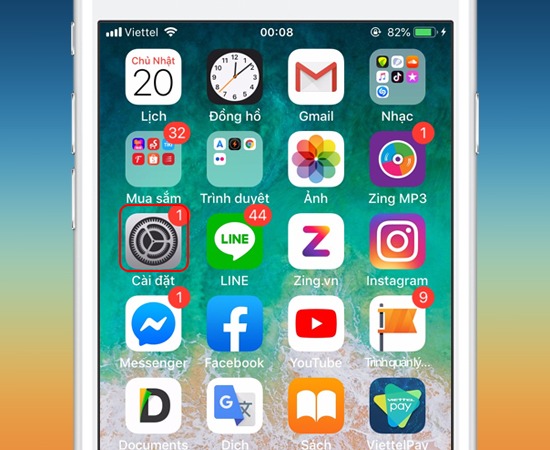
    Go to Settings -> General -> Keyboard -> Turn off Auto-Correction.

    Step 1: First, go to Settings.

    Bước 1: Bạn vào "Cài đặt"

    Step 2: Next, go to General.

    Bước 2: Tiếp theo đến phần Cài đặt chung.

    Step 3: Then, go to Keyboard.

    >>> See also: Deleting one or more contacts from your iPhone’s address book

    Bước 3: Sau đó vào phần Bàn phím.

    Step 4: Finally, turn off Auto-Correction.

    Bước 4: Cuối cùng tắt Tự động sửa.

    That’s it! You’ve successfully disabled text prediction on your iPhone 7 Plus.

    Good luck!

    Share. Facebook Twitter Pinterest LinkedIn Tumblr Email
    admin
    • Website

    Related Posts

    iPad Mini 4: Only 2GB RAM, Reduced Battery Capacity

    June 26, 2025

    iPad Air 6 M2: What Upgrades Are Worth the Upgrade From the iPad Air 5 M1?

    June 26, 2025

    Students Choose iPads for Learning and Entertainment: Which Series Is Best for You?

    June 25, 2025

    4 Steps to Detailed iPhone Battery Health Check with 3uTools

    June 24, 2025

    Dead ICCID Codes Impact Numerous Locked iPhones in Vietnam: Check Now

    June 24, 2025

    iPhone 14 Models: How Many Are There? Which One Should I Buy?

    June 24, 2025
    Leave A Reply Cancel Reply

    © 2025 ThemeSphere. Designed by ThemeSphere.

    Type above and press Enter to search. Press Esc to cancel.