


Highly useful apps are constantly developing. One of these is the 3uTools app available on iPhones. Its efficient functions can greatly assist you. Let’s learn how to use this software!
1. What is 3uTools software?
The 3uTools software is a tool that allows users to interact with iOS devices, especially iPhones, through a computer, similar to iTunes and iTools, but this application has many more superior features.
3uTools is a perfect combination of the utilities of iTunes and iTools, providing features that neither iTunes nor iTools offer. It also boasts high compatibility with your iOS device.

Connect your phone to your computer
3uTools is software that connects your iPhone to your computer, allowing you to easily copy photos, music, create ringtones, etc. The application lets you update your phone to the latest iOS version, supports Flash Firmware, or Jailbreak iOS with just one click…
The 3uTools tool was developed by 3uTeam and is currently available for free and supports Windows computers.
2. How to install 3uTools
Step 1: Download 3uToolsHERE.

Download 3uTools to your computer
Step 2: Open the downloaded file > Click Install.

Installing 3uTools
Step 3: Click Launch and wait a moment for 3uTools to be installed.

Launching 3uTools
3. Features of 3uTools
Info and iDevice
– These two features have the same function. When you access the application, 3uTools will display a notification panel containing your device information and basic specifications.
– Some typical operations: Installing 3u on iOS, cleaning, creating ringtones, converting video formats, or even restarting your phone…

Info and iDevice Tab
Apps
– Includes available apps in the tool, similar to the App Store on the iPhone; you can choose to quickly download them.
[info]
See detailed instructions on how to install apps on your iPhone via 3uTools:
- Simple and easy way to download games from your computer to your phone
[/info]

Photo, Music, Video, and Books
By clicking Import and selecting Select File or Folder, you can easily add photos, music, videos, and books from your computer to your iPhone.
You can also transfer photos, music, videos, and books from your iPhone to your computer by clicking Export.
Please also refer to How to copy music from your computer to your iPhone using 3uTools.

Photo, Music, Video, and Books on 3uTools
Ringtones
Contains a list of available ringtones for you to choose from. Just click Go Download in the middle of the screen, and the song will automatically be added to the ringtone list on your iPhone.

Files
This is where the data of your iOS device is stored, and it allows you to explore and edit more default settings, allowing you to discover more about technology.

Files Tab
Data
Here you can back up and restore contacts, messages, call logs, etc., from your iPhone to your computer and vice versa.

Data Tab
Flash & JB
This utility allows you to update software, jailbreak, and restore data quickly and easily.
You can see details in the article: How to Restore iPhone using 3uTools.

Flash & JB Tab
Toolbox
This utility allows you to perform more editing tasks with apps and data.
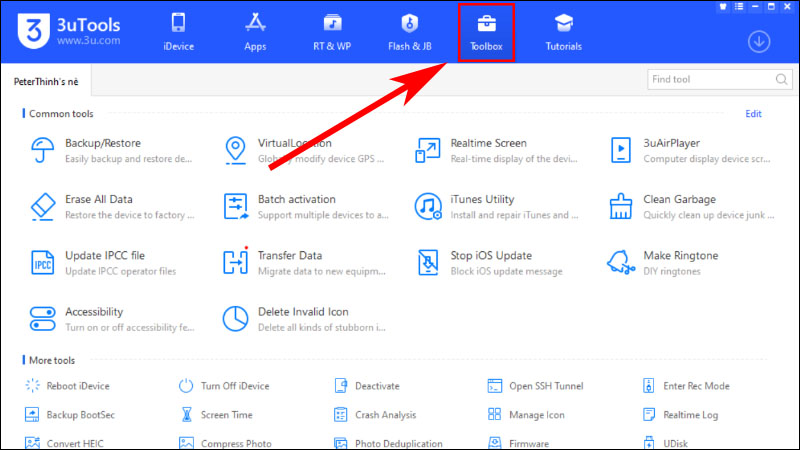
Toolbox Tab
4. How to use 3uTools
Changing the language to Vietnamese on 3uTools
Step 1: Click the three horizontal lines icon (Main Menu) > Click Settings.

