


NFC is a new and incredibly convenient feature on the iPhone, allowing users to transfer data, pay bills, etc., with a simple tap of their phone. In today’s article, I will introduce NFC on iPhone and guide you on how to quickly and easily enable and use NFC on your iPhone!
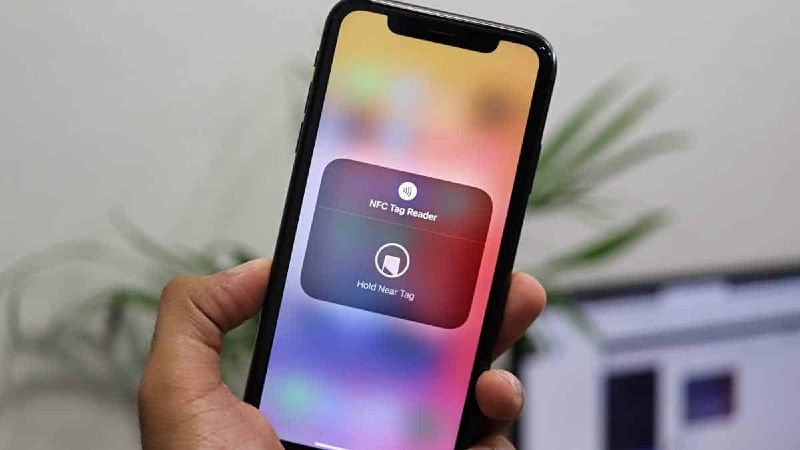
What is NFC on iPhone? How to enable and use NFC on iPhone
Apple products on sale up to 50%, check it out!
1. What is NFC on iPhone?
NFC (Near Field Communication) is a short-range communication technology – about 10cm or less. The NFC feature is widely used for contactless payment (contactless payment) through Apple Pay. In addition, NFC is also used to share data between two iPhones or between an iPhone and other NFC-enabled devices.
List of iPhone models supporting NFC
Below is a list of devices that support NFC Tag Reader:
- iPhone 7, 7 Plus
- iPhone 8, 8 Plus
- iPhone X
- iPhone XR
- iPhone XS and XS Max
- iPhone 11 series
- iPhone SE (2020)
- iPhone 12: iPhone 12, iPhone 12 Mini, iPhone 12 Pro, iPhone 12 Pro Max
- iPhone 13: iPhone 13, iPhone 13 Mini, iPhone 13 Pro, iPhone 13 Pro Max
- iPhone 14: iPhone 14, iPhone 14 Plus, iPhone 14 Pro, iPhone 14 Pro Max
- iPhone 15: iPhone 15, iPhone 15 Plus, iPhone 15 Pro, iPhone 15 Pro Max
- iPhone 16: iPhone 16, iPhone 16 Plus, iPhone 16 Pro, and iPhone 16 Pro Max
Check out the iPhones available at The Gioi Di Dong:
2. How to enable and use NFC on iPhone
Quick Guide
Go to Shortcuts > Automation > Create Personal Automation > NFC > Scan
Detailed Instructions
Step 1: First, go to the Shortcuts app and go to the Automation section.

Step 1
Step 2: Here, tap on Create Personal Automation.

Step 2
Step 3: Find and select NFC.

Step 3
Step 4: Tap the Scan button to finish.

Step 4
3. Conditions for using NFC on iPhone and other devices
To use NFC on your iPhone for payments or data exchange, you need to meet the following conditions:
- Your iPhone must support NFC.
- For payment functionality, you must add a payment card to Apple Pay. For iPhone XS and later, NFC will be enabled automatically when you add a payment card.
- To exchange data, both communicating devices must support NFC and be within 10cm of each other.
- The target device or payment terminal must also support NFC technology.
- NFC only works when the phone is on, the screen is unlocked, and within the operating range (approximately 4-10cm).
4. How to use NFC on iPhone
NFC on iPhone can be used for many different purposes by bringing your iPhone into contact with an NFC-enabled device.
Payments with NFC on iPhone via Apple Pay
Easily pay using NFC technology by tapping your iPhone to the store’s payment terminal. This method is becoming increasingly popular due to its convenience. Some popular payment systems using NFC technology include Apple Pay, Google Wallet, and Samsung Pay.
Additionally, Apple Pay can store credit or debit card information, enter hotel room codes or movie tickets, or even share membership cards or offers.

Convenient payments thanks to NFC technology
Sending Information and Data
NFC technology on iPhone can save you time reading NFC tags containing data or information. You can also share your personal information with others more quickly and easily. Here are some types of data you can exchange via NFC on your iPhone:
- Images: You can share images from your library to another NFC-enabled device.
- Videos: Similar to images, videos can also be shared via NFC.
- Contacts: You can exchange contact information from your phone book to another device.
- App Content: NFC-enabled apps can exchange data between them. For example, you can share an article from a news app or directions from your maps app.
- App Settings and Device Setup: NFC can also be used to configure and set up applications or devices. For example, you can use NFC to set up a wireless speaker or synchronize settings on two devices.
Automate Your Home
If you own smart devices in your home, using NFC technology is an experience you shouldn’t miss.

Perform multiple tasks with just one tap
With just an NFC-enabled phone, you can set up and control home devices, open/close doors, set alarms, or any other task with just one tap.
This article guides you on enabling and using NFC on your iPhone, helping your phone connect wirelessly with other devices at close range. If you found this article helpful, please leave a comment below. Good luck!
